Bald Filter
See what you would look like bald before you shave.
Upload a clear photo, and Aymo AI removes your hair to show a realistic bald or shaved head, matched to your skin tone and lighting. Try fully bald, a short shave, or a receding hairline.
Upload Your Photo
Choose a file or drag & drop it here.
JPG, PNG, or WEBP, up to 20 MB.
Don't have a photo?
Try a sample image




Your Bald Look in Seconds
Upload a clear photo and see a realistic bald look shaped to your head and face. Your face, beard, and expression stay the same, so it looks like you.
Matched Skin Tone and Light
The new scalp follows your skin tone, shading, and the lighting in your photo. Your real head shape is hidden under your hair, so the result is an informed estimate.


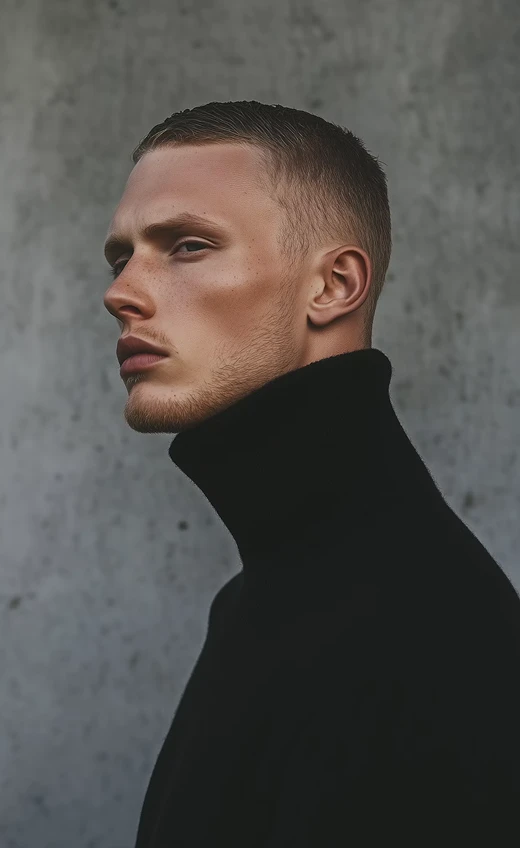
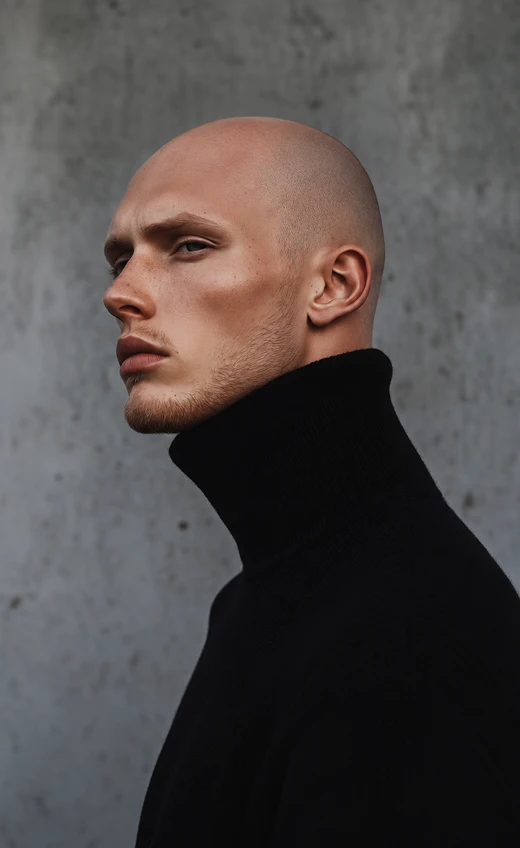
Fully Bald, Shaved, or Receding
Pick fully bald, a short shaved look, or a receding hairline, and compare it with your current hairstyle. See the result before you pick up the clippers.
How it works
How to See Yourself Bald
Try a bald look in four simple steps.
Step 1
Upload
Add a clear photo with your face and hairline visible. Long hair tied back gives a cleaner result.
Step 2
Choose a Look
Pick fully bald, shaved, or a receding hairline.

Step 3
Try Bald Look
Click Try Bald Look to see your new head shape.
Step 4
Download
Preview the result, then download it, up to 4K on paid plans.

Who it's for
Who Uses a Bald Filter
Thinking About Shaving
See the result before you pick up the clippers.
Thinning Hair
Get used to the idea of a shaved head in private, at your own pace.
Supporting Someone
Preview a shaved head before shaving alongside a friend or family member.
Barbers and Clients
Show a client the full shave before the first pass.
Actors and Cosplayers
Test a bald look for a role or character.
Social Media Users
Join the "what would I look like bald" trend with your own photo.
FAQ
Frequently Asked Questions
Answers on cost, accuracy, looks, consent, and privacy for the Bald Filter.
A bald filter removes the hair in your photo and shows the scalp beneath, so you can see a shaved head before you commit.
Yes. You can use the bald filter on the free plan. The free plan has usage limits and a lower maximum resolution, and paid plans raise both.
It gives a realistic idea, not an exact match. Your hair hides your real head shape and scalp, so the AI estimates them.
Fully bald, a short shaved look, or a receding hairline. Try each one and compare them with your current hairstyle.
It can show you what a shaved head may look like, privately and without pressure. It is a visual preview only and does not give medical advice.
Only with their permission. Do not use the bald filter to embarrass or mock anyone.
Yes. Your photos stay in your account and are not used to train models. You control who can see anything you share.
Ready to Explore?
Work Smarter With Multi-Model AI
Try new looks, edit photos, and create images with GPT Image, Nano Banana, FLUX, and Seedream in one secure workspace.